
FREE 2D CAD · OPTIONAL AI · BETA
Send the drawing. Keep the review in context.
CadFreely sharing opens a real CAD workspace for your recipient. Clients can pan, zoom and measure. You decide whether they can edit, download, print or leave review feedback.
Prepare a review link
- Open the drawing, check units and save the version you want reviewed. Choose Share drawing; sign in and save online if the drawing is still local.
- Choose Viewer for a client who needs to inspect and measure. Use Editable only if edits to your saved original are intended.
- Set Allow drawing file downloads and Allow printing separately. Full access includes both.
- Enable Allow comments and review decisions when you want feedback. Give this link a label such as “Client review — kitchen”.
- Create the link and copy it while it is shown. Open it yourself to check the permissions, then send it using your preferred communication tool.
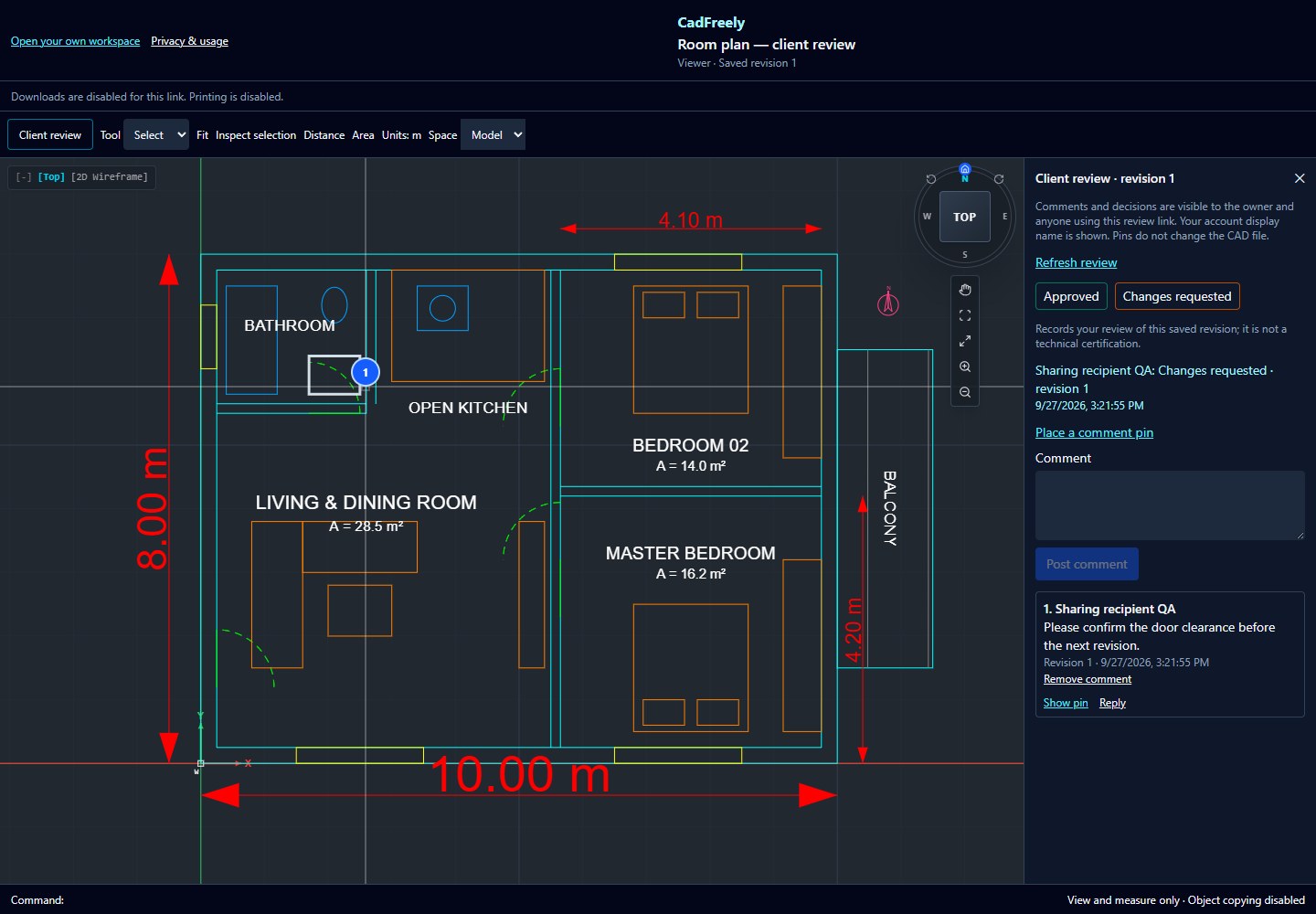
Collect feedback on a specific revision
A recipient can view without an account. When review is enabled, they sign in, open Client review and choose Place a comment pin. After selecting a location, they write a comment. Replies stay in that thread; the owner can resolve or reopen it from Review feedback in the sharing dialog.
Approved and Changes requested record that account's decision for the saved revision shown on screen. A new drawing revision needs a new decision. Earlier decisions remain labelled with their original revision. This is a review record, not an engineering certification or a digital signature.
Feedback is separate for each link. The owner and anyone with that review link can read its comments and account display names. Avoid putting sensitive information into a link you intend to distribute widely.
Choose permissions to match the job
| Access | Drawing tools | Copy and export |
|---|---|---|
| Viewer | Pan, zoom, inspect and measure | Object copying off; file downloads and printing only if allowed |
| Editable | Sign in to edit the saved original, with revision conflict checks | Object copy and paste allowed; file downloads and printing are separate choices |
| Full access | Sign in to edit the saved original | Object copying, downloads and printing allowed |
Client review is a separate option for all three levels. Adding comments does not turn a Viewer into an editor.
Close or pause the review
Open Share drawing and choose Close link for the link you want to stop. Future server access is denied, including comments and downloads. Open pages recheck access periodically. You can also switch off review while leaving drawing viewing available.
Only the drawing owner manages links. Closing one does not close the owner's other links.
Understand the boundary
An interactive viewer receives drawing geometry. Download, print and copy controls restrict the app's tools; they cannot prevent screenshots or deliberate extraction. Closing a link cannot recall a copy already received. Use your own judgement when sharing confidential work.
For a fixed sheet instead of an interactive drawing, follow the PDF plotting guide. For inspection, see measuring a DWG online.